

TL; DR
Flutter lets teams ship beautiful, high-performance mobile apps with one codebase, one design system, and one delivery pipeline. In 2025, mature state-management patterns, first-class tooling, and robust CI/CD make Flutter a pragmatic choice for startups and enterprises alike.
Why Flutter (and Why Now)
- Single codebase, native feel: Flutter renders with Skia, so your UI looks identical across iOS and Android with smooth 60–120fps animations.
- Faster iteration: Hot reload + strong package ecosystem = rapid feature cycles.
- Design consistency: A shared widget layer makes it easy to maintain a cohesive brand and design system.
- Lower total cost: Fewer heads to hire and manage, one QA surface, one CI/CD.
- Ecosystem maturity: Tooling for testing, accessibility, and release automation has caught up—less yak-shaving, more shipping.
When Flutter Is a Great Fit
- Greenfield consumer apps (marketplaces, social, media, fintech).
- Enterprise portals with secure auth, offline mode, and dashboards.
- Startups that must iterate quickly with limited engineering budget.
- Design-heavy experiences that need fluid animations and custom UI.
- Multi-platform roadmaps (mobile today; web/desktop/tablets tomorrow).
When to think twice:
- Deep platform-specific features updated monthly by Apple/Google (e.g., brand-new OS APIs) or heavy proprietary SDKs with weak Flutter bindings. You can still do it—just budget time for platform channels and native shims.
A Clean Architecture That Scales
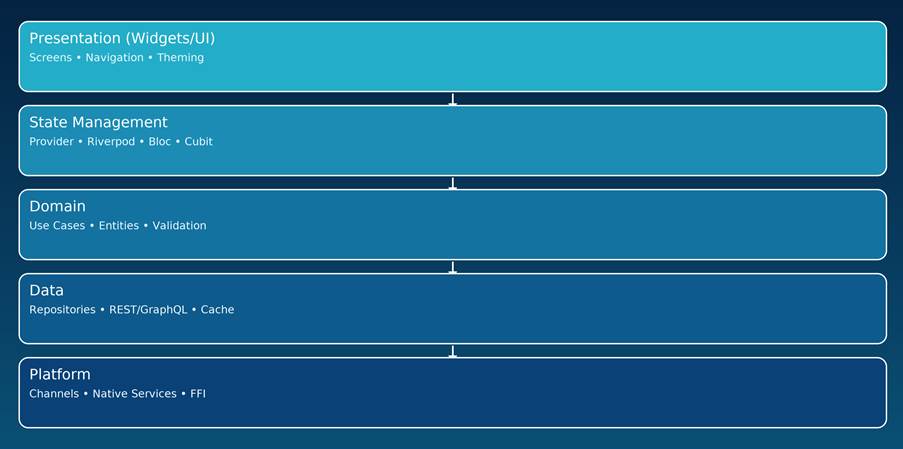
Use a layered approach to keep UI snappy and business logic testable:
- Presentation (Widgets/UI): Screens, navigation, theming, animations.
- State Management: Provider/Riverpod/Bloc/Cubit orchestrate app state.
- Domain: Pure Dart entities and use-cases (no Flutter imports).
- Data: Repositories, data sources, DTOs, caching (REST/GraphQL/local).
- Platform: Platform channels/FFI for native services and device APIs.
Benefit: you can swap a REST backend for GraphQL or add an offline cache without touching your Widgets.
State Management—Choose by Team, Not Hype
- Provider: Minimal boilerplate, good for small/medium apps.
- Riverpod: Compile-safe, no BuildContext passing, scales well.
- Bloc/Cubit: Event-driven, predictable transitions, enterprise favorite.
- GetX/MobX/Redux: Niche fits; weigh simplicity vs long-term clarity.
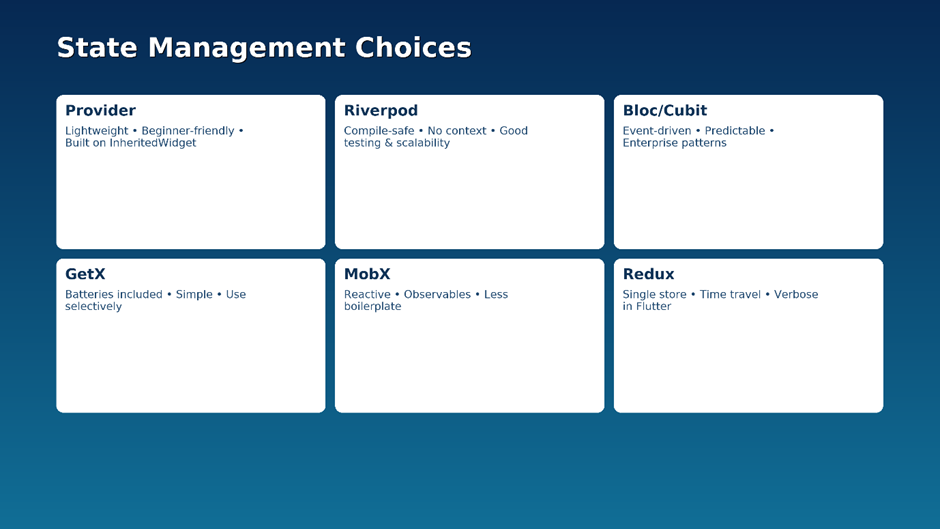
Rule of thumb: Start with Riverpod or Provider. For large, multi-team apps with strict predictability and analytics on transitions, use Bloc.
Project Layout
lib/
app/ # app.dart (MaterialApp), routes, theme
features/
auth/
data/ # dtos, datasources, repositories
domain/ # entities, usecases
presentation/ # screens, widgets, controllers
home/…
shared/ # common widgets, utils, services
test/ # unit & widget tests
integration_test/ # end-to-end
assets/ # images, fonts, lottie
Performance Playbook
- Use const constructors and keys to avoid unnecessary rebuilds.
- Prefer composition over deeply nested conditional trees.
- Cache images (cached_network_image), debounce searches, paginate lists.
- Offload heavy work to isolates; avoid synchronous blocking on main thread.
- Profile with flutter run –profile and the DevTools Performance tab.
Native Integrations (The Pragmatic Way)
- Platform Channels: Bridge to Kotlin/Swift for OS-level features.
- FFI: Call C/C++ directly for compute-heavy tasks.
- Wrap vendor SDKs once (with tests), expose clean Dart APIs, and keep the rest of your app blissfully unaware.
Testing Strategy That Actually Sticks
- Unit tests: Pure Dart logic (entities/use-cases).
- Widget tests: Layout/interaction snapshots, golden tests for UI drift.
- Integration tests: Real device flows; use integration_test + emulators/real devices in CI.
- Aim for fast, flaky-free suites; keep end-to-end tests focused on your money paths.
CI/CD That Doesn’t Break on Friday
- Triggers: PR → Lint/format → Unit & widget tests → Build artifacts.
- Signing: Automate certificates/profiles (Fastlane for iOS, Play signing).
- Channels: Internal → Staging → Production with rollout percentages.
- Observability: Crashlytics/Sentry + performance traces post-release.
Security & Compliance Essentials
- Secure storage for tokens (platform-backed keystores).
- TLS only, certificate pinning for sensitive apps.
- Obfuscation/minification on release builds; strip logs and debug flags.
- PII minimization and consent flows for analytics.
- Code reviews + SAST gates in CI for risky modules.
Accessibility, i18n, and Theming
- Respect dynamic text scaling; test with screen readers.
- Provide semantic labels and focus order.
- Extract copy to ARB files; use flutter_localizations.
- Build a design system (typography, colours, elevation, spacing) once and reuse across features.
Analytics & Growth
- Instrument events tied to outcomes (activation, retention, revenue).
- Use A/B flags for experiments; don’t hardcode cohort logic.
- Funnel dashboards + qualitative session replays give the full picture.
Timeline & Team Shape (Typical MVP)
- 2–4 weeks: Auth, navigation, base theme, design system.
- 4–8 weeks: Core features, API integration, offline cache.
- 2–3 weeks: Harden, tests, telemetry, beta → store submission.
- Team: 1–2 Flutter devs + 1 backend + 1 designer + part-time QA/PM.
Common Pitfalls (and How to Avoid Them)
- Massive God widgets: Split by responsibility; lift state up.
- Ad-hoc networking: Centralize in repositories; add retry/backoff.
- Untested animations: Protect custom transitions with golden tests.
- Manual release steps: Automate or you’ll ship hotfixes manually forever.
FAQs
Is Flutter “native enough”?
Yes—Flutter draws with its own renderer and calls platform APIs via channels. When you need cutting-edge native features, expose them through a small, tested bridge.
How big are APK/IPA sizes?
With modern tooling and tree-shaking, sizes are competitive; keep assets optimized and avoid unused packages.
What about web/desktop?
Nice bonus. For complex web apps, you may still prefer a dedicated web stack, but Flutter Web is solid for dashboards and admin tools.
Call to Action
If you want a roadmap, architecture, or a sprint plan for your Flutter app, we can help—whether you’re starting fresh or scaling an existing codebase.